Skip to the good bit
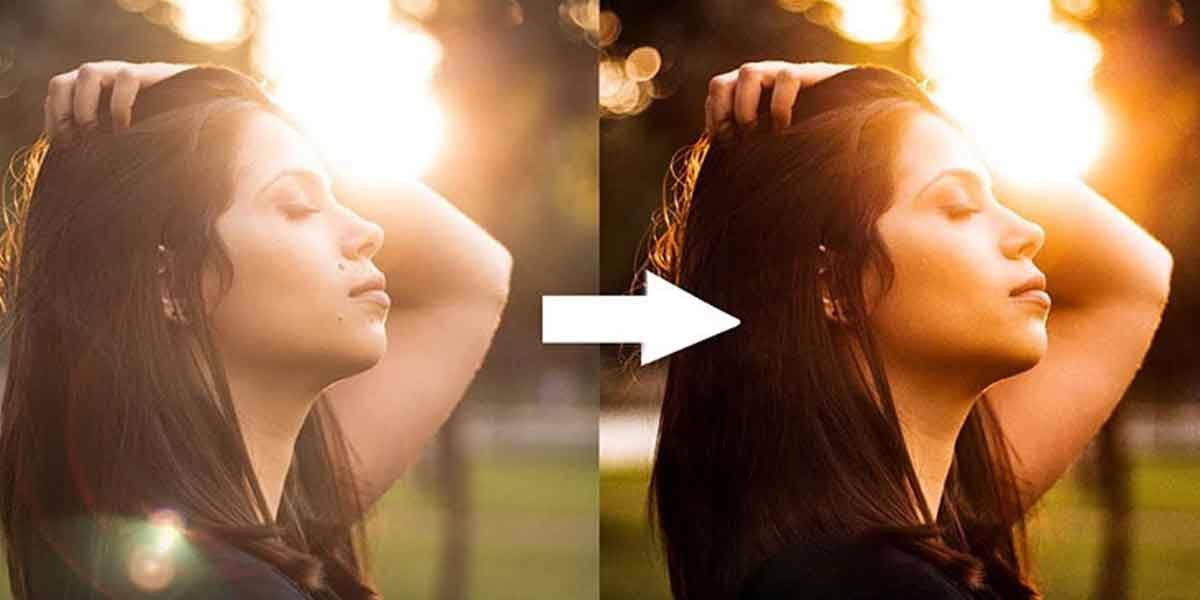
ToggleIt happens on the best days. The light is golden, the location is perfect, the moment is exactly right. Then the photos come back and there it is: a washed-out streak of blown highlights, a milky haze across the subject, or a lens flare cutting right through the centre of an otherwise brilliant shot. Sun glare is one of the most frustrating problems in outdoor photography, and for most of its history, fixing it required either a skilled hand in Photoshop or the acceptance that the photo was simply unusable.
That has changed substantially. AI-powered photo editing tools in 2026 have made glare removal faster, more accessible, and more convincing than anything manual editing could achieve at the same speed. The results are not always perfect, but they are good enough to rescue shots that would previously have gone straight to the trash folder.
This guide covers what sun glare actually is, why it is technically difficult to remove, how AI tools approach the problem differently from traditional editing software, and what to look for when choosing the right tool for different types of shots.
What Sun Glare Is and Why It Is Harder to Fix Than It Looks
Sun glare in photography refers to the visual degradation that occurs when direct or reflected sunlight enters the camera lens and interferes with the image sensor’s ability to record accurate colour and detail. It appears in several distinct forms: lens flare, which creates geometric light artefacts across the frame; haze or veiling glare, which reduces overall contrast and washes out colours; and specular highlights, which are overexposed bright spots where reflected light has completely saturated the sensor.
The reason glare is difficult to remove is that the affected areas contain no usable image data. When a portion of a photo is blown out by direct sunlight, the pixels in that region are recording maximum values across all colour channels. There is nothing underneath to recover. Any fix requires the editing software to reconstruct plausible image content from surrounding context, which is exactly the kind of task that AI excels at and that manual clone-stamping or healing brush tools handle inconsistently.
Here is what most guides on this topic skip over: the type of glare matters enormously for choosing the right fix. A discrete lens flare artefact sitting against a uniform sky is a very different editing problem from diffuse haze covering a textured surface or a subject’s face. Treating all glare the same way is why so many attempted fixes look artificial.
How AI Tools Approach Glare Removal Differently
Traditional photo editing software relies on the user to manually select affected areas and then apply healing, cloning, or frequency separation techniques to reconstruct the missing detail. This works reasonably well for small, isolated glare spots with simple surrounding context. It becomes time-consuming and results-inconsistent on larger affected areas, complex backgrounds, or portraits where facial features need to be preserved under the glare.
AI-based glare removal tools use deep learning models trained on large datasets of images with and without glare to identify affected regions automatically and generate realistic replacements based on surrounding image content. The better tools in this category in 2026 can distinguish between different glare types, preserve edge detail at the boundary of the affected area, and match texture and colour in ways that manual editing cannot achieve in comparable time.
The tradeoff is control. AI tools make decisions automatically, which produces fast results but does not always align with what the photographer actually wants. A portrait photographer who wants specific skin tone preservation under a glare fix may find that a manual approach in a dedicated editing suite gives better final results, even if it takes longer. AI tools win on speed and accessibility. Manual techniques win on precision when the stakes are high enough to justify the time investment.
Step-by-Step: How to Remove Sun Glare From a Photo Using AI
The workflow for AI-based glare removal is broadly consistent across tools, though interface details vary. Here is the general process that applies to most current AI photo editing platforms.
- Upload the image. Most AI tools accept JPEG and PNG files. For best results, use the highest resolution version of the image available. More pixels give the AI model more context to work with when reconstructing glare-affected areas.
- Identify the glare type. Before applying any automatic fix, assess whether the glare is localised (a discrete flare or hot spot) or diffuse (general haze across the image). This determines whether a targeted or global correction will produce better results.
- Apply the AI glare removal. Depending on the tool, this may happen automatically on upload, or require selecting a specific glare removal function. Let the AI generate its initial result before making any manual adjustments.
- Review boundary areas carefully. The edges of AI-corrected regions are where artefacts most commonly appear. Zoom in to check for unnatural transitions, colour mismatches, or texture inconsistencies that the AI has not fully resolved.
- Fine-tune contrast and colour. After glare removal, the corrected area often needs minor contrast and saturation adjustments to match the surrounding image. Most AI tools include basic colour correction sliders for this purpose.
- Export at full resolution. Save the corrected image at the highest resolution the tool supports. Compression artefacts in the output can undo the quality gains from the glare correction.
Which Types of Photos Respond Best to AI Glare Removal
Landscape and Outdoor Scenes
Landscape photos with glare affecting sky regions or water surfaces tend to respond well to AI correction because the surrounding context is relatively uniform and predictable. The AI has enough similar pixels nearby to generate convincing replacements. Where AI glare removal on landscapes struggles is at complex boundaries, such as tree canopies against a bright sky or the waterline in a seascape, where the transition between high-contrast elements requires careful reconstruction.
Portrait Photography
Portrait photos with glare on skin, glasses, or clothing are among the most challenging for AI tools because human visual perception is extremely sensitive to anything that looks wrong in a face. AI glare removal on portraits works best for isolated glare spots on non-facial areas. For glare affecting eyes, skin tone, or facial structure, the results from current AI tools are more variable and may require manual refinement to achieve a natural-looking result.
Architecture and Real Estate Photos
Real estate and architectural photography often suffers from window glare and facade reflection, where direct sunlight creates overexposed regions that obscure building detail. AI tools handle this category well when the glare is confined to a window pane or a portion of a flat facade. For photographers and content creators who regularly encounter this problem, tools that allow users to remove sun glare from photo quickly and without specialist software knowledge are a genuine workflow improvement over traditional editing methods. CapCut’s dedicated glare removal tool is one of the more accessible options for this use case, particularly for creators who need fast turnaround without advanced editing skills.
The Honest Limitations of AI Glare Removal in 2026
Most content covering AI photo editing tools focuses on what they can do. It is worth being direct about what they cannot do reliably, because over-relying on AI correction at the shooting stage leads to images that are harder to salvage than they needed to be.
AI glare removal cannot recover genuinely lost image data. When a region is completely blown out, the AI is generating plausible content rather than restoring actual captured detail. In large affected areas, especially on complex subjects, the generated content may look convincing at web resolution but falls apart under close inspection or at print sizes. For professional work where image integrity matters, prevention at the shooting stage, using lens hoods, polarising filters, or adjusted shooting angles, is still far more reliable than post-production correction.
AI is not a substitute for good shooting technique. It is a rescue tool for the shots where good technique was not enough. Understanding that distinction prevents the most common mistake in AI-assisted photography workflows: treating AI correction as a safety net that eliminates the need for careful exposure management in the field.
Frequently Asked Questions
Can AI tools completely remove sun glare from any photo?
Not always. AI glare removal works best on localised glare with manageable affected areas and sufficient surrounding context for the AI to generate realistic replacements. Large blown-out regions, complex subjects like faces or detailed textures, and images with diffuse haze across the entire frame are harder to correct convincingly. Results depend on the specific image, the quality of the AI model, and whether manual refinement is applied after the automated correction.
What is the difference between lens flare and sun glare?
Lens flare refers specifically to the geometric light artefacts, including circles, hexagons, and streaks, that appear when direct light hits the lens elements and creates internal reflections. Sun glare is a broader term covering all forms of image degradation caused by direct or reflected sunlight, including lens flare, veiling glare (overall haze and contrast reduction), and specular highlights (overexposed bright spots). Both are addressable with AI editing tools, but they require different correction approaches.
Are free AI glare removal tools good enough for professional use?
For web and social media use, free AI glare removal tools available in 2026 produce results that are generally acceptable and significantly better than nothing. For print work, high-resolution editorial photography, or any application where the corrected image will receive close scrutiny, the output quality of free tools may not meet professional standards. In those cases, dedicated editing software with manual correction capabilities, used alongside AI suggestions rather than as a replacement for them, tends to produce more reliable results.
Better Photos Without Waiting for Perfect Light
Sun glare has always been a fact of life for outdoor photographers. The light that creates beautiful golden-hour images is the same light that washes out highlights and sends lens flare streaking across the frame. For most of photography’s history, the only reliable answers were technical prevention at the shooting stage or accepting that some shots were simply lost.
AI tools have genuinely changed that calculus in 2026. They are not magic, and they are not a replacement for shooting craft. But for the shots that glare partially ruins, they offer a practical rescue option that would have required significant technical skill and editing time just a few years ago. That accessibility matters, whether the work is professional or personal.
Which type of lighting situation creates the most persistent glare problems in a specific photography workflow, and has AI correction changed how those shots get approached at the capture stage?