
Skip to the good bit
ToggleFor many music enthusiasts, the dream has always been to lead a band without the logistical headaches of finding a drummer who shows up on time or a bassist who owns a working amp. The emergence of high-quality tools has turned this dream into a reality. Using Musick AI, anyone can step into the role of a producer and bandleader, assembling a virtual ensemble that plays exactly what is needed.
This guide explains how to use this AI Music Maker to move past simple track generation and start training a consistent sound that belongs solely to the creator. By understanding the nuances of the interface and the logic behind the generation models, users can transform from casual listeners into active creators.
I. Defining the Sound Profile of the Virtual Ensemble
- Establishing a Core Identity
Building a digital band starts with a clear vision. Instead of asking for random tracks, focus on defining a signature style. This consistency is what separates a collection of songs from a cohesive musical project. When a producer knows the “vibe” they want, the output becomes much more predictable and professional.
- The Power of Precise Prompting
To get the most out of an AI Music Generator, specific descriptions are necessary. Rather than typing “rock music,” describe the setup: “A four-piece indie rock band with a clean electric guitar, driving bass, and a steady 120 BPM drum kit.” By specifying instruments and tempo, the system understands the “members” of the band and how they should interact.
- Consistent Vocal Casting
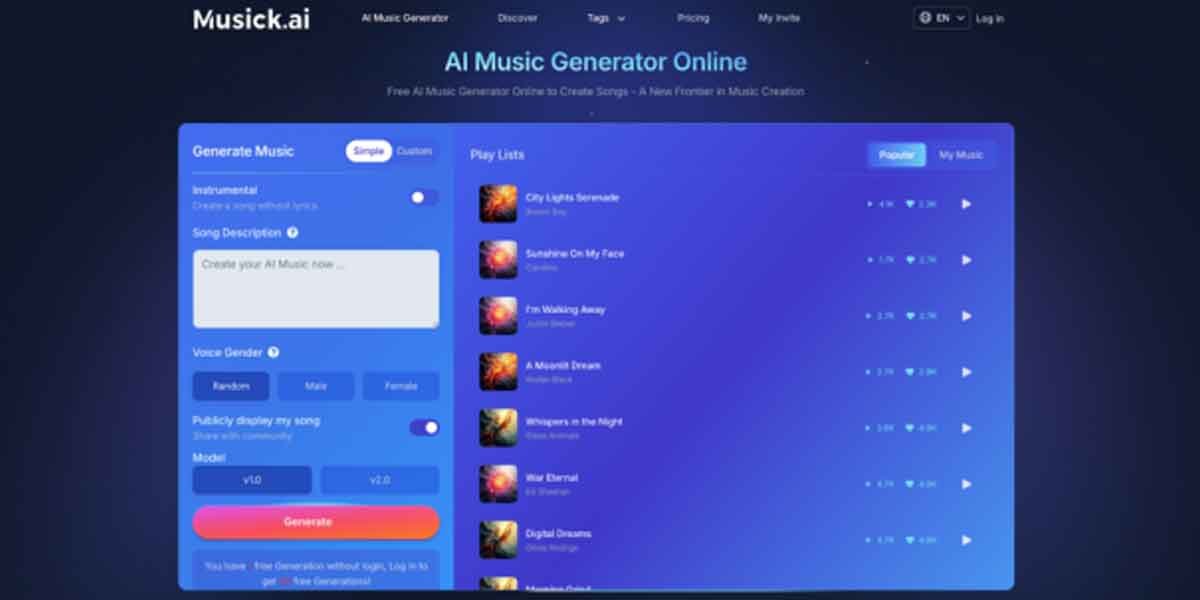
One of the standout features of Musick AI is the ability to choose the voice gender. If the goal is a pop-punk group, selecting a “Male” vocal preference consistently across different tracks helps maintain the feeling of a single lead singer. This choice, combined with specific genre tags like “Pop” or “Rock and roll,” establishes the vocal foundation for an entire album’s worth of material.
II. Navigating the Technical Setup for Custom Tracks
- Mastering the Custom Mode
The “Simple Custom” toggle is where the real work happens. In this mode, users can input their own lyrics or choose to create an “Instrumental” if the band is performing a backing track. When using the AI Song Generator, providing a structured lyric sheet—including markers for [Verse] and [Chorus]—gives the engine a roadmap for the song’s energy shifts.
- Selecting the Right Version
The platform offers different versions, such as v1.0 and v2.0, to suit different needs. For those looking for the most advanced harmonies and complex structures, v2.0 is generally the preferred choice for a professional sound. It handles “Large-scale” compositions with better awareness of complex harmonies, making it easier to create music that sounds like it was recorded in a high-end studio.
- Optimizing Audio Quality
Generating the notes is only half the battle; the quality of the sound matters just as much. Users should explore the settings to ensure the output matches their intended use case. Whether the goal is a quick demo or a high-fidelity track, selecting the appropriate model parameters ensures the “virtual studio” delivers the best possible acoustic results.
III. Refining Genre and Mood for Cohesion
- Exploring the Music Plaza
The Music Plaza serves as a massive library of inspiration for new bandleaders. By exploring categories like “Jazz,” “R&B,” “Metal,” or “EDM,” users can see how different tags influence the final output. To “train” a digital band, it is best to stay within a cluster of related genres so the tracks feel like they belong together.
- Using Tags for Atmospheric Control
Beyond genre, the “Mood” is critical for setting the right tone. If a project requires a “nostalgic” or “uplifting” feel, these keywords should be included in the song description. This ensures that the AI Music Maker doesn’t just play the right notes, but plays them with the right emotion, mimicking how a human performer would interpret a lead sheet.
- Building a Genre Strategy
Mixing “Blues” and “Soul” tags will keep the virtual musicians in the same creative space across multiple sessions. This strategic use of tags prevents the “band” from sounding too disjointed. By sticking to a specific set of 3-5 tags, a user can ensure that every track they generate sounds like it came from the same group of performers.
IV. Advanced Production: Beats, Lyrics, and Raps
- Writing with the Lyrics Tool
A diverse digital band isn’t limited to traditional instruments. Modern projects often require specialized elements like custom beats or intricate lyrics. The AI Lyrics Generator can help overcome writer’s block by suggesting rhymes and themes based on the chosen genre, providing the “frontman” with something meaningful to say.
- Rhythm and Beat Production
The AI Beat Producer allows for more granular control over the rhythm section of the track. For those who want to make music with a modern hip-hop or electronic edge, this tool is indispensable. It allows the user to focus specifically on the “heartbeat” of the song before layering on melodies and vocals.
- Specialized Vocal Delivery
For projects that require a different vocal style, the AI Rap Generator is specifically tuned to handle rhythmic delivery. It ensures the “vocalist” stays on beat and maintains the correct flow for the genre. This level of specialization allows a single user to manage a band that can pivot from melodic singing to rhythmic rapping seamlessly.
V. Managing and Exporting the Digital Catalog
- Organizing the Discography
As the number of tracks grows, the “My Music” section becomes the band’s official discography. Keeping track of which prompts produced the best results is essential for future sessions. Because the AI Song Maker works fast, it is easy to generate dozens of tracks; the real skill lies in selecting the “A-sides” that fit the band’s image.
- Licensing and Commercial Usage
One of the most practical benefits of using Musick AI is the focus on legal clarity. The platform emphasizes that its library is built with consent and adheres to copyright laws. This is vital for anyone looking to share their work on social media or streaming services without the fear of legal complications.
- Upgrading for Professional Growth
For creators wanting to use their digital band’s music for commercial projects, moving to a Basic or Unlimited plan is a logical step. This provides a commercial license, ensuring the music remains “royalty-free.” It protects the user from copyright strikes while allowing their digital creations to reach a global audience on platforms like YouTube and Instagram.
VI. Conclusion
Leading a personal digital band is no longer a privilege reserved for those with expensive studio gear or years of formal training. By combining the right prompts, consistent vocal settings, and strategic genre tagging within Musick AI, any creator can maintain a professional and unified musical identity. This shift from passive listener to active conductor allows your creative vision to take center stage, bypassing the technical hurdles that used to stand in the way.
In this new era of creation, Musick AI provides the unique opportunity to collaborate with virtual instrumentalists and vocalists who are always ready to perform. Whether you are producing a soundtrack for a personal channel or aiming to release your first full-length single, these tools bridge the gap between imagination and reality. As technology continues to evolve, your tireless virtual ensemble will remain your most reliable creative partner, helping you discover and define your own unique sound.