The practical problem with modern image editing is not always a lack of tools. More often, it is the gap between intention and execution. Many people know what they want a picture to become, but translating that idea into layers, masks, selections, and repeated manual adjustments takes time. That is where AI Photo Editor becomes interesting. Instead of asking users to master a full traditional editing workflow first, it turns image editing into a simpler sequence: upload an image, choose an editing tool, describe the change, and let the system generate a result that can be reviewed and refined.
That shift matters because most everyday editing needs are not abstract design exercises. They are concrete requests. Remove the object. Clean the background. sharpen the image. change the style. keep the subject but alter the mood. In my observation, tools become more useful when they reduce the distance between those requests and the finished result. PicEditor appears to be built around that idea. It presents AI editing as a direct, web-based process rather than a heavy software environment that must be learned before anything useful happens.
What Makes This Editing Approach Different
Traditional editing software gives users deep control, but it also assumes patience, technical familiarity, and time. PicEditor takes a different route. It combines multiple AI editing functions in one online platform and lets the user begin from the image itself rather than from a blank technical workspace.
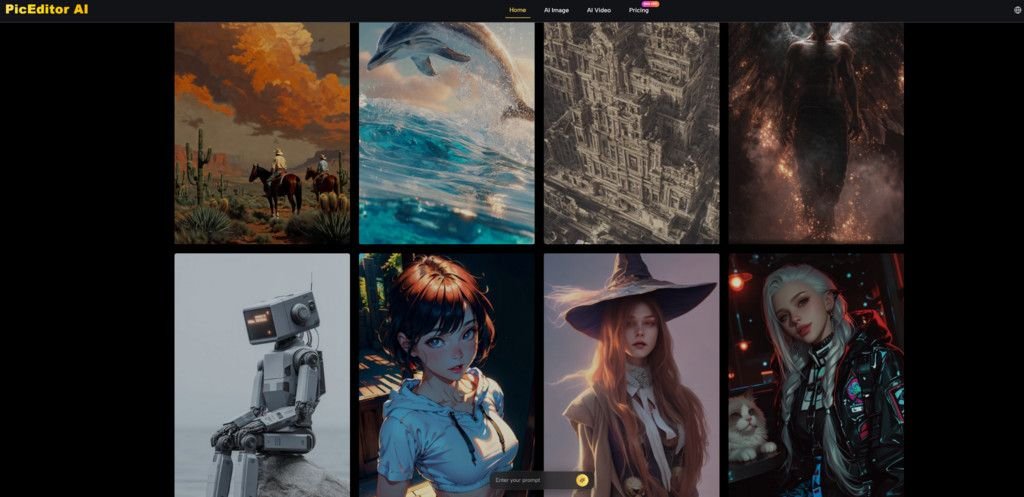
From the platform’s public presentation, the value is not just that it can change a picture. The value is that it organizes several common tasks into one system: enhancement, upscale, background removal, generative editing, style transfer, object erasing, and even photo-to-video animation. That makes the platform easier to understand for people who want outcomes more than process.
Another meaningful difference is model variety. The site presents itself not as a single-model editor, but as an all-in-one environment that integrates several engines such as Nano Banana, Nano Banana 2, Seedream, Flux, and Veo. In practical terms, that suggests the platform is designed to match different editing jobs with different strengths, instead of forcing every request through one model logic.
How The Core Workflow Actually Operates
The AI Image Editor workflow is simple, which is part of the appeal. The platform does not describe a long onboarding sequence. It describes a short editing loop that can be understood quickly.
Start with an Existing Image First
The process begins with image upload. This matters because the platform is not framed only as a text-to-image generator. It is presented primarily as an editor built around a source image. That source image provides composition, subject placement, color relationships, and visual identity before any AI modification begins.
Choose the Editing Function Needed
After upload, the user selects a tool based on the type of change they want. This is important because the platform is not limited to one editing mode. It includes separate capabilities for enhancement, object removal, style transformation, and animation. In practice, that means the user is not giving one vague request to one universal box. They are first narrowing the task.
Describe the Desired Change Clearly
The next step is prompt-based instruction. The platform asks users to describe what they want changed, improved, or transformed. In my view, this is where the product becomes accessible. Instead of requiring technical editing actions, it lets users communicate intent in ordinary language. That does not remove the need for clear thinking, but it does lower the barrier to getting started.
Review the Generated Result and Iterate
The final stage is generation and review. The system analyzes the image and applies the requested edit. This does not guarantee perfection on the first try, and the platform itself implicitly allows for iteration by making prompt-based edits quick to run. That matters because generative editing is usually strongest when used as an iterative process rather than a one-click promise.
Why Multiple Models Matter in Real Use
A common weakness in AI products is that they advertise many outcomes but rely on one engine to do everything. PicEditor’s public structure suggests a different philosophy. It highlights several models and positions them as complementary rather than redundant.
Nano Banana for Realism and Consistency
Nano Banana is presented as a high-detail engine that supports hyper-realistic results, style transfer, advanced text understanding, character consistency, and up to four reference images. That combination is especially relevant for users who care about maintaining the identity of a subject while changing other parts of the image.
In my observation, consistency is often the difference between an AI tool that feels impressive and one that feels usable. A beautiful single output is helpful, but repeated reliability is what makes a tool fit into a workflow.
Seedream for Faster Creative Cycling
Seedream is presented as a fast-processing option. That sounds less dramatic than realism claims, but speed can be a serious advantage. When users are still deciding on direction, faster turnaround often matters more than maximum refinement. The ability to try multiple variations quickly can make decision-making easier.
Flux for More Controlled Edits
Flux is positioned around professional control. For users who need more deliberate adjustment, that matters. Not every image problem is solved by broad transformation. Sometimes the need is narrower: replace one element, preserve context, change only one region, or direct the system more precisely.
Veo for Moving Beyond Still Images
The inclusion of Veo extends the platform beyond static editing. The site presents photo-to-video animation as part of the same environment. That changes the platform’s role. It is no longer only a photo cleanup or styling tool. It becomes a place where a still image can also be turned into dynamic content for marketing, storytelling, or social use.
Where This Platform Can Be Genuinely Useful
The most credible use cases are usually the simplest ones. Not every user needs cinematic transformation. Many just need faster ways to improve or repurpose existing images.
For ecommerce teams, the practical value may be product cleanup, sharper visuals, background replacement, or multiple style directions from one base asset. For creators, the benefit may be transforming a portrait into a new visual style without rebuilding the image from scratch. For marketers, the interesting part may be that a still image can become both a polished static asset and a motion asset in one environment.
That said, the strongest advantage may be workflow compression. One platform covering enhancement, generative editing, style transfer, and animation reduces switching costs. Even if each individual output still benefits from human judgment, reducing tool fragmentation can make creative work less slow.
Which Product Traits Stand Out Most Clearly
The platform’s public positioning becomes easier to understand when the features are compared as workflow traits rather than as marketing claims.
| Editing Dimension | What PicEditor Publicly Emphasizes | Why It Matters in Practice |
| Access model | Browser-based online editing | Lowers setup friction |
| Tool range | 10+ image editing functions | Covers common image tasks in one place |
| Interaction style | Upload image, choose tool, enter prompt | Makes editing intent easier to express |
| Reference support | Up to 4 reference images on Nano Banana | Helps preserve consistency |
| Output direction | Static image editing plus photo animation | Supports broader content reuse |
| Model structure | Multiple engines in one platform | Better fit for varied tasks |
| Entry point | Free to start | Easier to test before committing |
Where The Limits Still Need To Be Acknowledged
A more useful review of any AI editor should include its likely constraints, not just its convenience. PicEditor is no exception.
Prompt Quality Still Shapes Results
The interface may be simpler than traditional editing, but results still depend on how clearly the user describes the change. Vague instructions often produce vague outputs. In my experience with tools like this, the difference between an average result and a strong one is often not the tool alone, but the precision of the request.
One Generation May Not Be the Final One
Generative editing is fast, but that does not mean every first attempt is final. Some images need a second or third pass to reach the right balance of realism, composition, and intent. That is not necessarily a flaw. It is part of working with systems that interpret direction rather than executing manual edits exactly.
Iteration Is Part of the Workflow
This is worth stating plainly because it improves expectations. The platform seems most effective when treated as a rapid iteration environment. Users who expect perfect first-pass results from every prompt may be disappointed. Users who treat it as a fast idea-to-output loop will probably understand its value more accurately.
Why This Kind of Tool Matters Now
The broader shift behind platforms like PicEditor is not only technical. It is behavioral. Image editing is moving from command-based manipulation toward intent-based generation. That does not replace professional editing knowledge, but it does change who can produce useful visual results and how quickly they can do it.
PicEditor fits that shift well because it does not present AI editing as a single magical function. It presents it as a practical set of tasks: enhance, remove, transfer, animate, refine. That framing is more believable. It makes the platform easier to understand and easier to place inside everyday creative work.
For people who want a simpler path from idea to edited image, that may be the most important point. The value is not only what the system can generate. The value is that it turns image editing into a shorter, more understandable process without pretending that judgment, iteration, and clear direction no longer matter.